Run colors
When runs appear together — in Compare and Side-by-side — each run is drawn in a consistent color so you can track it across every chart and the tooltip.
Customizing a run’s color
Section titled “Customizing a run’s color”Set a run’s color from its row actions in the runs table:
- Hover the run’s row and open Customize color.
- Use the color picker — drag on the swatch or type a hex value — to choose a color.
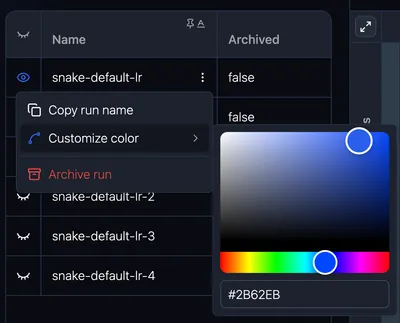
The color is then used wherever that run is plotted alongside others.
Where colors are remembered
Section titled “Where colors are remembered”Your run color choices are saved locally in your browser, so they persist across sessions on that device. Because they’re stored per-browser, colors you set aren’t shared with teammates — each person can color runs to their own preference.